Cloud LLMs are powerful, but building reliable features when the model lives entirely on the phone is a unique challenge. This post explores the Apple Intelligence integration I solo-built for a personal project. Receipt scanning and natural-language fuel logging run entirely on-device. Here’s an honest look at what works, what doesn’t, and how to handle the inevitable edge cases.
The Foundation
The framework in two minutes
%%{init: {'theme': 'base', 'themeVariables': { 'primaryColor': '#ffffff', 'primaryTextColor': '#000000', 'primaryBorderColor': '#000000', 'lineColor': '#000000', 'secondaryColor': '#ffffff', 'tertiaryColor': '#ffffff', 'clusterBkg': '#ffffff', 'clusterBorder': '#000000'}}}%%
---
title: Figure 1. Apple Intelligence API Call Structure
---
flowchart LR
    A[SystemLanguageModel] -.->|1. Capability check| B[LanguageModelSession]
    B -->|2. respond to input| C[@Generable struct]
There are three main types you will interact with: SystemLanguageModel for capability checks, LanguageModelSession for the call, and @Generable structs for typed structured output. The entire call structure looks like this:
let session = LanguageModelSession(instructions: systemPrompt)
let response = try await session.respond(to: userInput, generating: ParsedFuelReceiptSchema.self)
let parsed: ParsedFuelReceiptSchema = response.content
Streaming exists via streamResponse(to:). But for a structured-output pipeline like processing receipts, you want the entire struct in one shot. My project does not use streaming.
The combined context window (instructions + prompt + response) is 4096 tokens. Plenty for a single receipt, but worth knowing if you’re chaining or accumulating history.
Availability is the first thing your UI has to know
Foundation Models are gated by device, user setting, and model download state. The framework distinguishes between all three. Your UI should too. I bubble the reason up as a banner so the user knows why AI didn’t run:
static var unavailableReason: String? {
    guard #available(iOS 26, *) else { return nil }
    switch SystemLanguageModel.default.availability {
    case .available:
        return nil
    case .unavailable(let reason):
        switch reason {
        case .deviceNotEligible:
            return "This device doesn't support Apple Intelligence."
        case .appleIntelligenceNotEnabled:
            return "Enable Apple Intelligence in Settings -> Apple Intelligence & Siri to improve receipt scanning accuracy."
        case .modelNotReady:
            return "The AI model is still downloading. Connect to Wi-Fi and try again shortly."
        @unknown default:
            return "Apple Intelligence is not available right now."
        }
    }
}
Handling the @unknown default is non-negotiable. The enum is non-frozen, so Apple may add cases in future iOS versions, and @unknown default is mandatory to keep the switch exhaustive across SDK upgrades.
Beyond availability, generation itself can fail at runtime. LanguageModelSession.GenerationError surfaces cases like .guardrailViolation (Apple’s safety filter triggered, sometimes false-positively), .exceededContextWindowSize (4096-token combined limit), and .unsupportedLanguageOrLocale. In production I surface a soft retry for guardrail violations on receipts (rephrase and try once) and a hard fallback to regex for anything else.
Working Around Limitations
%%{init: {'theme': 'base', 'themeVariables': { 'primaryColor': '#ffffff', 'primaryTextColor': '#000000', 'primaryBorderColor': '#000000', 'lineColor': '#000000', 'secondaryColor': '#ffffff', 'tertiaryColor': '#ffffff', 'clusterBkg': '#ffffff', 'clusterBorder': '#000000'}}}%%
---
title: Figure 2. The OCR Preformatting Pipeline
---
flowchart LR
    A[Receipt Image] --> B[Vision OCR]
    B -->|Row clustering| C[Spatial Text]
    C -->|Sanitize| D[Preformatted String]
    D --> E((Foundation Model))

    classDef ai fill:#ffffff,stroke:#000000,stroke-width:2px;
    class E ai;
Foundation Models don’t see images yet. Vision earns its keep.
As of iOS 26.3, the public Foundation Models API is strictly text-in, text-out. While the model family has a vision encoder under the hood (Apple’s tech report describes a RW-ViTDet stack), the framework doesn’t expose it. Multiple developer write-ups confirm this limitation. See Natasha The Robot’s intro and this DEV post.
For a receipt parser, this is fine. Vision is readily available and highly effective. My pipeline operates in two stages: VNRecognizeTextRequest extracts the text, I format it spatially, and the Foundation Model structures it into a typed schema. When Apple eventually ships image input, the OCR stage becomes obsolete, but the schema remains relevant.
The OCR pipeline doing the unglamorous work
The OCR configuration matters more than most people realize. Two specific settings significantly impact receipt parsing:
let request = VNRecognizeTextRequest()
request.recognitionLevel = .accurate
// Vision's supportedRecognitionLanguages does not include Filipino as of iOS 26.
// Philippine receipts are typically Latin script, so English handles them well.
// Augment domain vocabulary via customWords instead.
request.recognitionLanguages = ["en-US"]
request.customWords = ["V-POWER", "Petron", "Shell", "Caltex" /* add station/brand tokens */]
// Disabled: language correction rewrites receipt-specific tokens
// like "V-POWER", abbreviations, and local product codes.
request.usesLanguageCorrection = false
The comment highlights the core issue. Vision’s language correction is great for prose but terrible for receipts. It will rewrite words like “V-POWER” and industry-specific jargon. Turning it off sacrifices a bit of accuracy on common English words but saves the crucial tokens.
A note on the Vision API: this guide uses the legacy VNRecognizeTextRequest for familiarity, but iOS 18+ ships a Swift-native struct-based API (RecognizeTextRequest and RecognizeDocumentsRequest) which I’d recommend for new code. The latter can replace much of the spatial row-grouping logic with built-in structured output.
I also keep the top-5 text candidates per observation using topCandidates(5) instead of just the first. The downstream parser uses these as a recovery mechanism when the primary guess misreads a word.
Vision reads left-to-right and misses wide gaps (like “TOTAL INVOICE” and “$45.00”). To fix this, I group observations by their Y-midpoint using a dynamic tolerance based on median text height:
// 1. Calculate a dynamic tolerance based on the median text height
let heights = sorted.map(\.boundingBox.height).sorted()
let medianHeight = heights[heights.count / 2]
let rowTolerance = max(medianHeight * 0.5, 0.004)

// 2. Group observations into rows if they vertically align
for text in sorted {
    // If we moved down too far, save the current row and start a new one
    if let anchor = currentRow.first, abs(text.boundingBox.midY - anchor.boundingBox.midY) > rowTolerance {
        currentRow.sort { $0.boundingBox.minX < $1.boundingBox.minX }
        rows.append(currentRow)
        currentRow.removeAll()
    }

    currentRow.append(text)
}
Using a median-height-derived threshold allows this to scale for both small gas-station thermal receipts and larger formats from independent shops. A fixed threshold would inevitably break on one or the other.
Preformatting is the part that moves your scores
The model receives the rows in a stable, spatial format. Each is prefixed with the row index and Y-coordinate:
Row 00  [y=0.07]  SHELL V-POWER
Row 01  [y=0.12]  STATION 4521
Row 02  [y=0.41]  VOLUME      12.500 G
Row 03  [y=0.42]  PRICE/G     3.60
Row 04  [y=0.55]  TOTAL INVOICE  45.00
There are two reasons for this:
- Spatial reasoning: The
Row NN [y=…]format teaches the model to use position (e.g. the total is usually at the bottom). - Cheap citations: When asking the model to explain its extraction, the row index serves as an unambiguous reference.
Before any of this data hits the model, I apply a strict whitelist sanitization:
private func sanitizeOCRText(_ text: String) -> String {
    let maxLength = 2000
    let truncated = String(text.prefix(maxLength))
    let allowed = CharacterSet.alphanumerics
        .union(.whitespaces)
        .union(.newlines)
        .union(CharacterSet(charactersIn: "$.,;:/()-#@&*+"))
    return String(truncated.unicodeScalars.filter { allowed.contains($0) })
}
This isn’t paranoia. Anything that comes from a camera is untrusted user input. A printed prompt-injection on a sticker that a user photographs is a simple attack, and it works. Whitelisting characters that legitimately appear on receipts and dropping the rest provides a strong defense. The 2000-character cap handles the rest.
The Generable schema is the contract
@Generable types compile down to the JSON schema that the framework hands the model. The @Guide annotations allow you to write the instructions for each field directly next to the field, rather than in a large block of text:
@Generable
struct ParsedFuelReceiptSchema {
    @Guide(description: "Total amount paid in USD ($10 to $200). Look for TOTAL INVOICE, GRAND TOTAL, AMOUNT DUE, SALE TOTAL. Numeric value only, no currency symbol.")
    var totalAmount: Double?

    @Guide(description: "Volume of fuel dispensed (gallons or liters). Look for VOLUME, GALLONS, LITERS, QTY, or a readout like '12.500G x 3.60$/G'. Numeric only.")
    var volume: Double?

    @Guide(description: "Short reasoning: which receipt row(s) you read totalAmount from, which you read volume from, which you read price from. One or two sentences max.")
    var reasoning: String?

    @Guide(description: "True if totalAmount equals volume × pricePerUnit within 1%. False if they disagree or if any of the three is missing.")
    var arithmeticCheckPassed: Bool?
}
The reasoning and arithmeticCheckPassed fields are not exposed to the user. They exist solely to give the model a place to execute its chain-of-thought and self-checks. Both are discarded at runtime, except for arithmeticCheckPassed, which gates the next section.
Two small knobs on the respond call matter for production receipt extraction:
let response = try await session.respond(
    to: userInput,
    generating: ParsedFuelReceiptSchema.self,
    options: GenerationOptions(sampling: .greedy)
)
Receipts shouldn’t be creative. .greedy sampling gives deterministic, reproducible extraction for the same OCR input. Once your @Generable schema is stable in production, also pass includeSchemaInPrompt: false to skip re-sending the schema on each call. The Generable already encodes the structure for the framework.
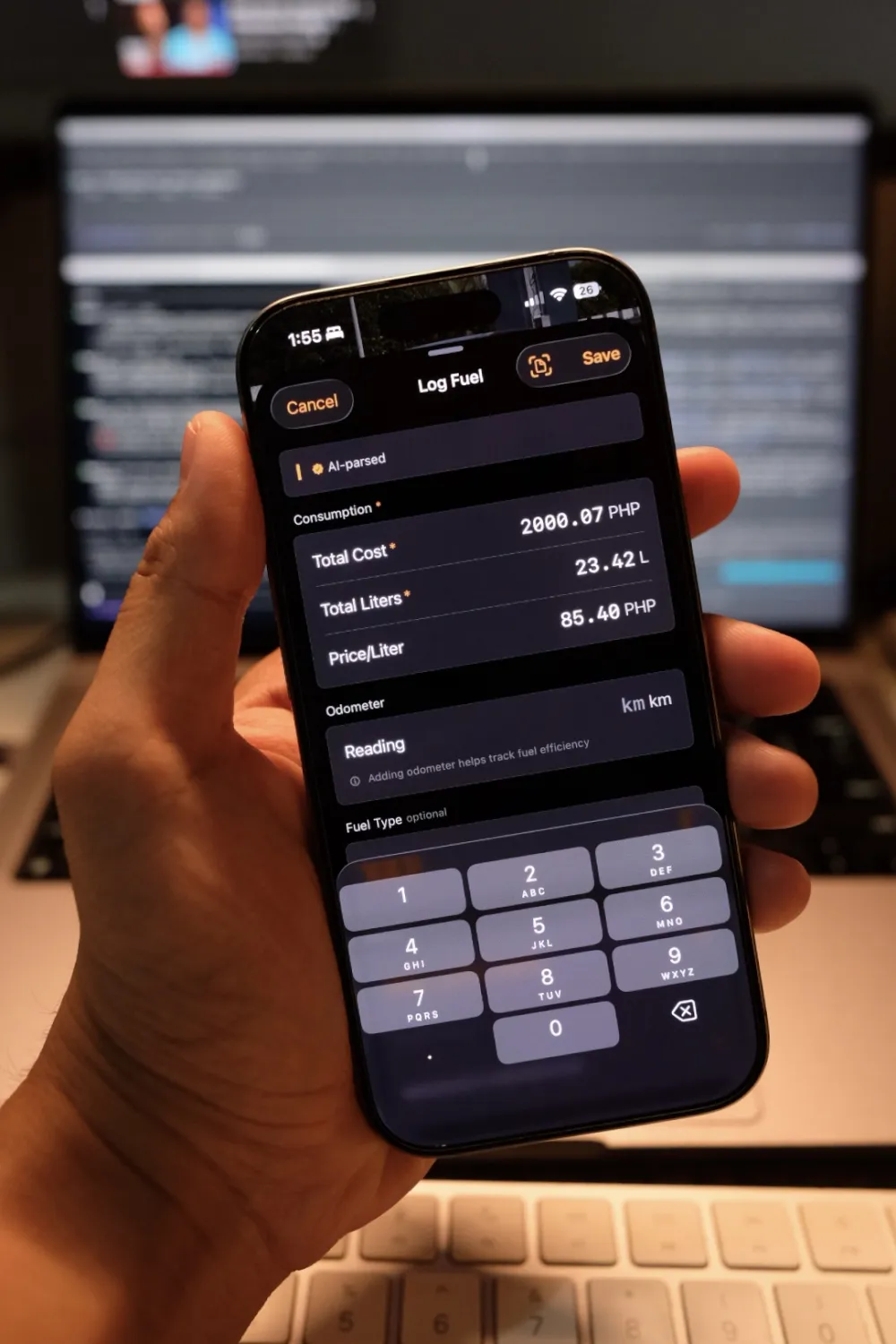
What it looks like in the app
Receipt in, parsed fields out.

Building for Reliability
Self-consistency, not retries
A receipt has a strict arithmetic invariant. The total must equal the volume multiplied by the price per unit, allowing for minor rounding. If the extracted values disagree by more than 1%, something is wrong. The model misread one of the numbers.
I do not blindly retry the request. I re-prompt the same session with the previous extraction and explicitly call out the inconsistency. I then accept the retry only if the new delta is strictly smaller than the original. I allow a maximum of one retry.
This approach costs an extra API call in the rare bad case, and zero extra calls in the common good case. It is a much better use of a second call than a blind retry, which often returns the identical wrong answer because the underlying OCR was flawed.
Three-tier fallback when the model is uncertain
The model gets a vote, not a veto. My pipeline runs OCR alongside a regex parser in parallel with the LLM extraction, then merges the results:
if let ai = aiResult, ai.confidence >= 0.5, ai.totalCost != nil {
    return merge(ai: ai, regex: regexResult, ocrText: ocr.fullText, method: .foundationModels)
} else if let ai = aiResult, (ai.totalCost != nil || regexResult.totalCost != nil) {
    return merge(ai: ai, regex: regexResult, ocrText: ocr.fullText, method: .hybrid)
} else {
    // pure regex path
}
%%{init: {'theme': 'base', 'themeVariables': { 'primaryColor': '#ffffff', 'primaryTextColor': '#000000', 'primaryBorderColor': '#000000', 'lineColor': '#000000', 'secondaryColor': '#ffffff', 'tertiaryColor': '#ffffff', 'clusterBkg': '#ffffff', 'clusterBorder': '#000000'}}}%%
---
title: Figure 3. Three-Tier Fallback Pipeline
---
flowchart TD
    A[OCR Output] --> B{AI Model Result}
    B -->|High Confidence| C[Merge: AI overrides]
    B -->|Low Confidence / Missing Fields| D[Merge: Hybrid fallback]
    B -->|No Result| E[Pure Regex Path]

    C --> F((Final Data))
    D --> F
    E --> F

    classDef decision fill:#f9f9f9,stroke:#000000,stroke-width:1px,stroke-dasharray: 5 5;
    class B decision;
The regex parser is rigid and deterministic, establishing a reliable baseline. The LLM handles edge cases that regex misses, such as non-standard formats or handwritten additions. The hybrid path merges the best of both:
- AI for text: Trusts the model for unstructured data like the station brand.
- Regex for numbers: Relies on the parser for literal numerics when the two disagree beyond a certain threshold.
Two OCR to LLM paths, by design
The project offers two ways for a user to provide an image: the receipt scanner and the chat interface. These take entirely different paths:
%%{init: {'theme': 'base', 'themeVariables': { 'primaryColor': '#ffffff', 'primaryTextColor': '#000000', 'primaryBorderColor': '#000000', 'lineColor': '#000000', 'secondaryColor': '#ffffff', 'tertiaryColor': '#ffffff', 'clusterBkg': '#ffffff', 'clusterBorder': '#000000'}}}%%
---
title: Figure 4. OCR and Prompt-Injection Mitigation Paths
---
flowchart LR
    subgraph Scanner Path
        A[Camera] --> B[OCR] --> C[Sanitize] --> D((Apple Intelligence))
    end

    subgraph Chat Path
        E[Chat Image] --> F[OCR] --> G[Sanitize] --> H((Regex Only))
    end

    classDef ai fill:#ffffff,stroke:#000000,stroke-width:2px;
    class D ai;
- Scanner to OCR to sanitize to LLM: This path uses a closed schema and a locked prompt. It assumes the user is photographing their own receipt.
- Chat with image to OCR to sanitize to regex only: This uses the same OCR and sanitization but never reaches the LLM. The chat schema is open-ended. The user could type anything alongside the image, making it prime real estate for prompt injection.
Limiting the blast radius on the chat path is my primary prompt-injection mitigation. Whitelist sanitization is applied to both, acting as defense-in-depth rather than the sole protective measure.
Cold-start: prewarm on the screen before the screen
The first call to a LanguageModelSession incurs the cost of building it. Subsequent calls are much faster. I mask this latency by warming the session on the screens before the user actually scans anything. I do this when they open their Garage, and again when they tap the scan menu:
@available(iOS 26, *)
private func warmSession() {
    if cachedSession != nil { return }
    let session = LanguageModelSession(instructions: systemPrompt)
    session.prewarm() // or: session.prewarm(promptPrefix: knownPrefixPrompt)
    cachedSession = session
}
We call .prewarm() immediately after construction to load model resources and cache the system prompt prefix. By the time the camera UI appears, the session is already built and warmed. The user-perceived latency for the actual scan is sub-second on an A17 Pro chip.
The receipt parser caches its session natively. Dynamic sessions (like chat) are currently built per-call, but they haven’t become a bottleneck yet.
The test corpus
A small on-device album of real receipts I run every change against before shipping.

Considerations & Takeaways
The initial integration might only take a weekend, but making it reliable is the real work. Here’s an honest look at the state of on-device Foundation Models today:
Where it shines:
- On-device execution: Free per call and sub-second fast on an A17 Pro chip.
- Structured outputs:
@Generableis arguably the most ergonomic way to extract typed JSON right now. - Privacy: Authentic and absolute. Nothing leaves the phone. Worth noting: the Foundation Models framework does not silently fall back to Private Cloud Compute. PCC is a separate code path used by Apple Intelligence system features (Writing Tools, Siri requests), not by direct
LanguageModelSessioncalls. If yourSystemLanguageModelis available, you’re on-device, full stop.
Where it stumbles:
- A roughly 3B-parameter model: It’s a specialized assistant, not an oracle. It requires extensive few-shot prompting to follow complex instructions reliably.
- No public image input yet: Vision is a mandatory workaround, forcing you to maintain complex OCR pipelines.
Building for production means building an eval loop
I currently ship without a formal eval suite. While my regex fallbacks and self-consistency checks provide a safety net, the underlying model ships with the OS. The regression surface is Apple’s, not mine.
A robust setup requires a golden-receipt corpus, a scoring harness for per-field tolerances, and automated runs on every iOS beta. If you integrate Foundation Models without this, you’re flying blind on the surface most likely to break. I’ve shipped the fallback architecture, but the eval loop is the piece I still owe myself.
—Joshua